Router & ISP monitor for Mac
Monitor your router and your ISP from your Mac
See live traffic for your whole network straight from your router, and know within seconds when your ISP drops or slows down. No router firmware, no server, no command line.
Free to download, with a free trial. Requires macOS 14.6 or later.
A router traffic monitor that runs on your Mac
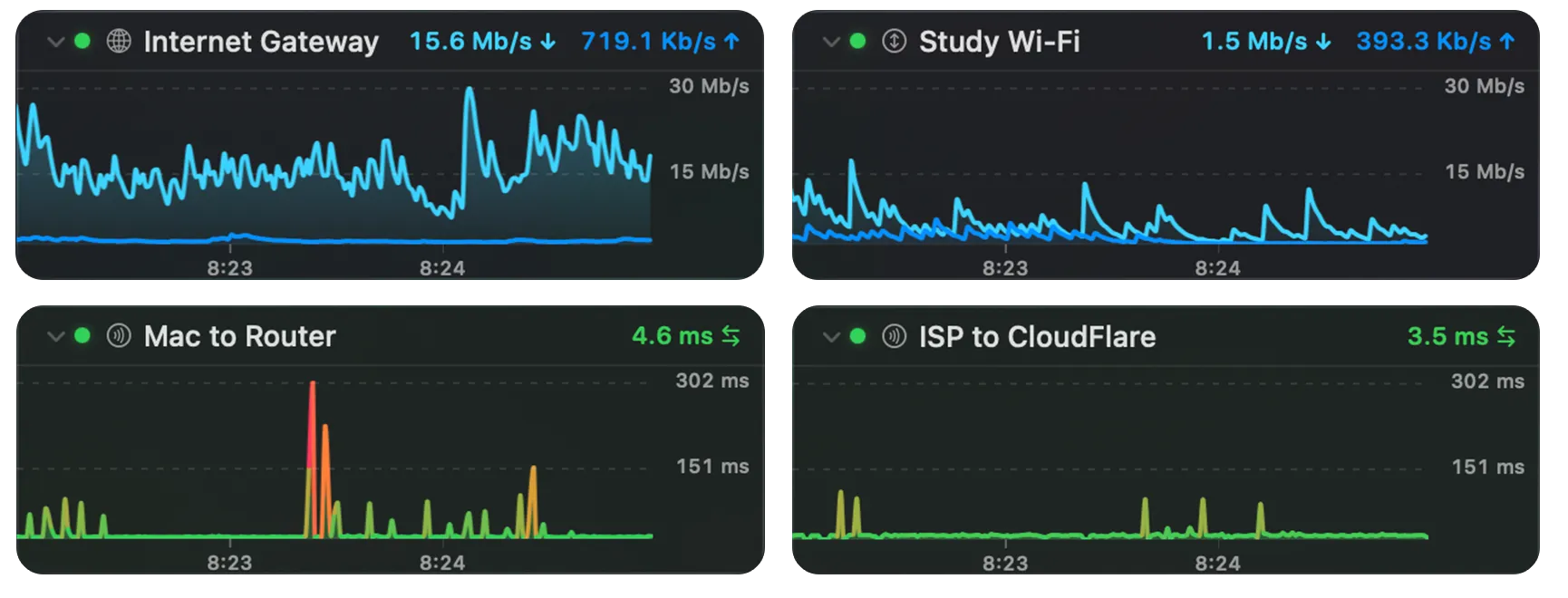
Your router sees every byte your household sends and receives, but most router admin pages show little history and make you log in to check. PeakHour reads the router's own traffic counters and turns them into live graphs and long-term history on your Mac.
- Finds your router for you. PeakHour discovers your internet gateway when you first open it, and switches when you move between networks.
- UPnP for home routers. Most home routers support UPnP. It's often off by default, so turn it on in your router's settings.
- SNMP for prosumer and business gear. SNMP v1, v2c and v3, with 64-bit counters where the device supports them. It works with SNMP-capable routers, firewalls and access points from brands such as Ubiquiti, MikroTik and Synology.
- Live in the menu bar. Upload and download for the whole network, with max-bandwidth lines that show how close you are to your plan's speed.
- Monthly usage from the router, counted against your ISP's data cap, with alerts before you reach it.
Router or ISP? See which one is at fault
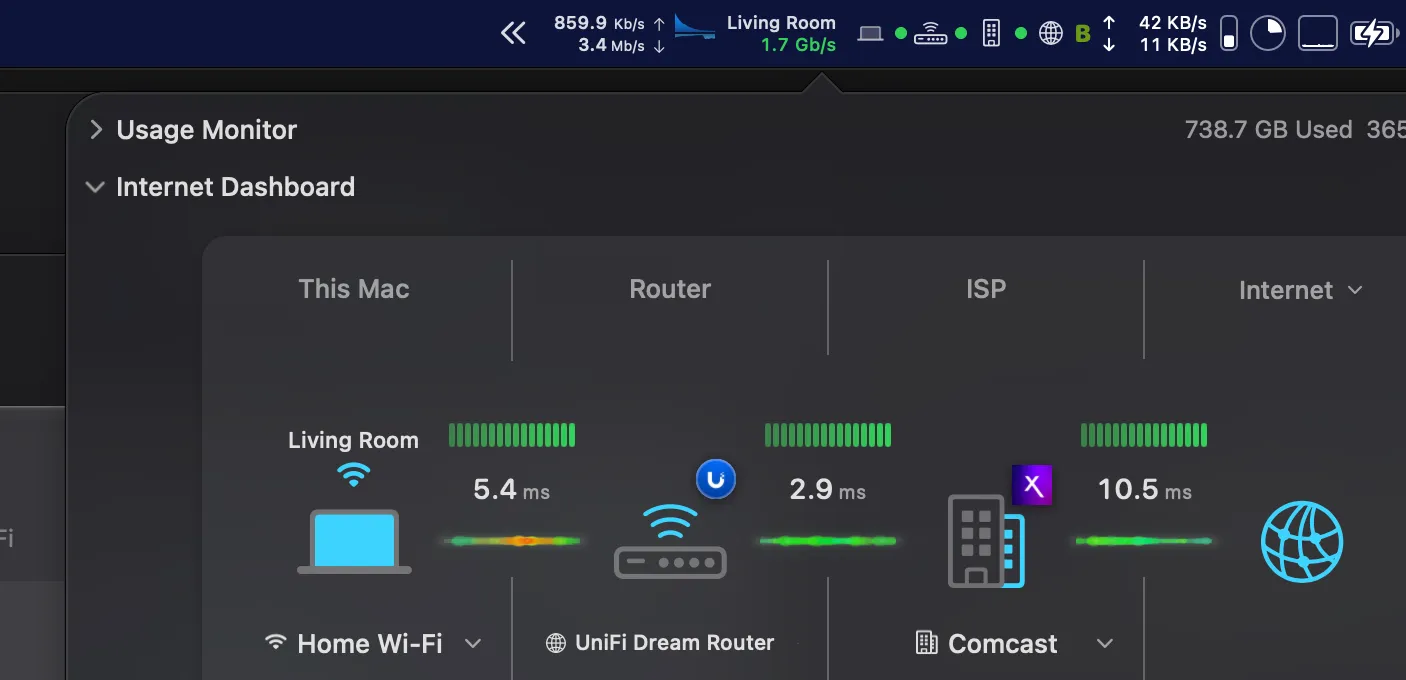
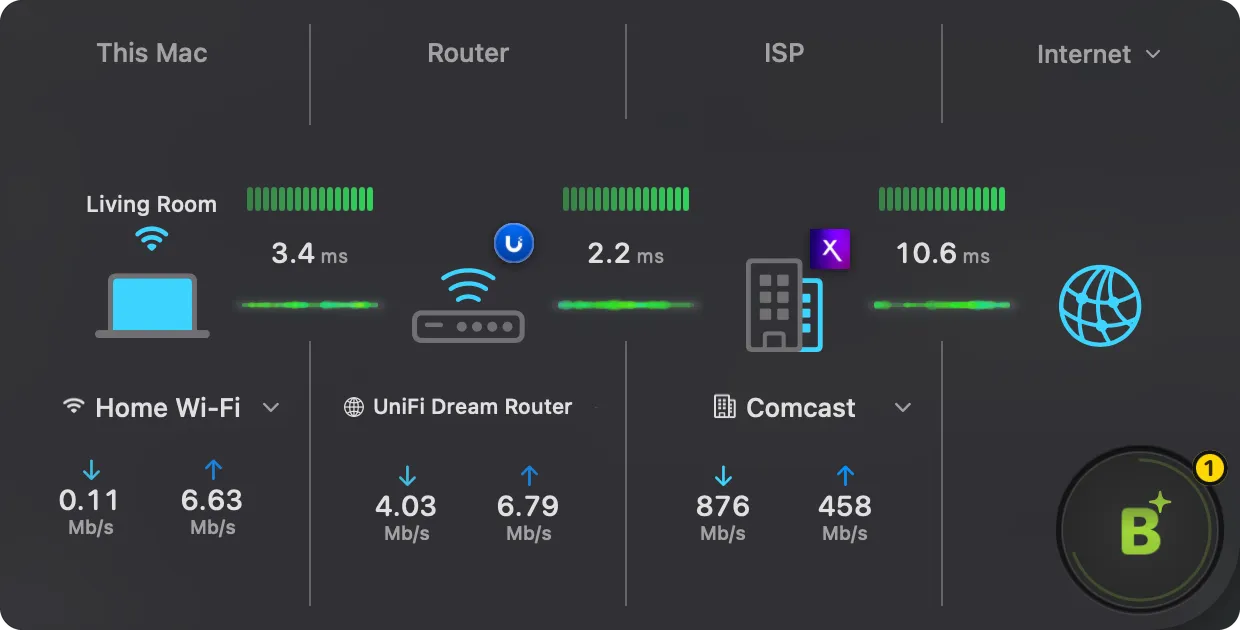
When the internet feels slow, the first question is whose problem it is. PeakHour measures each step on its own: from your Mac to your router, from your router to your ISP's gateway, and on to hosts on the internet such as Cloudflare, Google or Zoom. Latency, jitter and packet loss are tracked for each, and packet loss is reported over a rolling 5-minute window.
- Mac to router is bad: it's your Wi-Fi or your router.
- Router is fine, ISP gateway is bad: it's the line or your ISP.
- Everything is fine except one service: it's that service, not you.
An ISP monitor that keeps the evidence
"It's fine now" is the answer ISPs give when a fault comes and goes. PeakHour watches your connection around the clock and keeps the record:
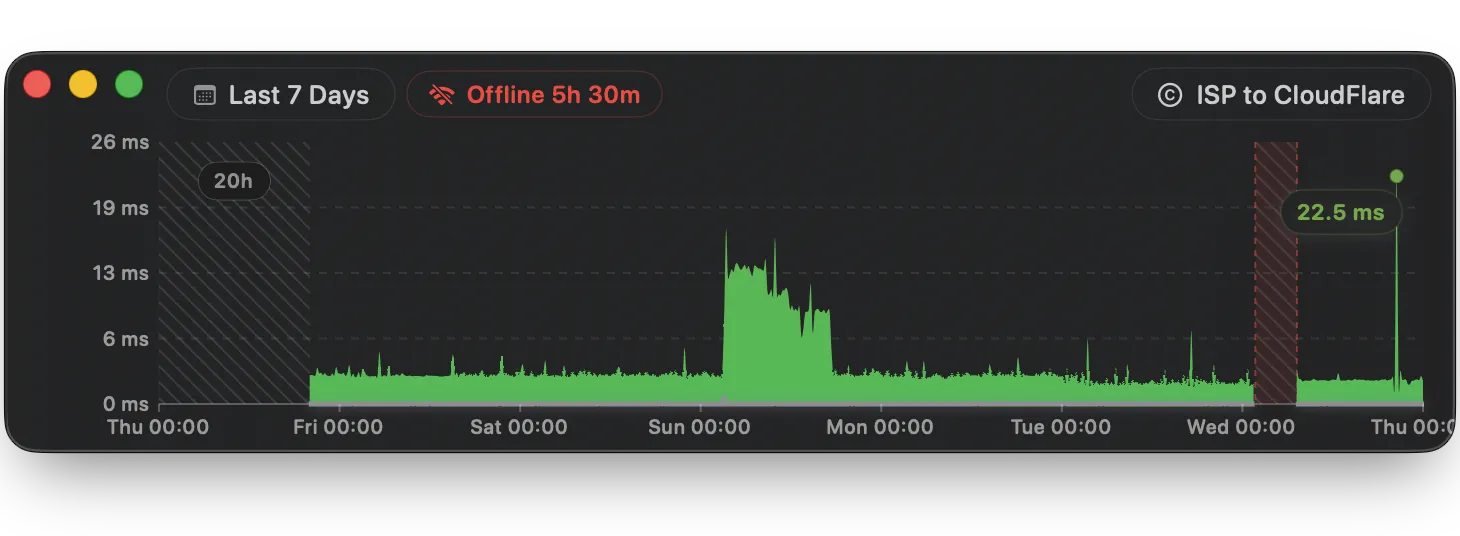
- Outage alerts. Notifications when your router or the internet becomes unreachable, and again when the connection is restored.
- Downtime history. The History window marks every outage and how long it lasted, alongside latency and bandwidth for the same hours.
- Scheduled speed and responsiveness tests. PeakHour can run Apple's network quality test every hour, every few hours or daily, and again when your network changes.
- ISP details, if you want them. Turn on ISP lookup to see your provider's name, network number (ASN), approximate location and your public IP address. It's off until you opt in.
- CSV logs. Write bandwidth or connection quality data to CSV files every minute or hour, to attach to a support ticket or analyse in a spreadsheet.
For a step-by-step approach, read how to track ISP performance on macOS.
Monitor more than the router
Anything on your network that speaks SNMP can be monitored directly: other Macs (PeakHour Enabler sets them up in a few clicks), Windows and Linux PCs, NAS drives, switches, firewalls and Wi-Fi access points. Your own Mac's interfaces work out of the box. Not sure which protocol to use? See SNMP vs UPnP.
PeakHour measures traffic by device and interface. It doesn't inspect packets, and it doesn't break traffic down by app or website.
Built for home and small-office networks
Router monitoring software such as PRTG, ManageEngine or Zabbix is built for IT departments: it needs a server, setup time and often per-sensor licences. PeakHour is a native Mac app that sets itself up in minutes, lives in your menu bar, and costs $19.99 a year or $59.99 once. PeakHour Remote lets you check the dashboard from a phone or any browser on your network.
Frequently asked questions
How do I monitor my router's traffic from a Mac?
Turn on UPnP in your router's settings (or SNMP, if your router has it), then install PeakHour. It finds your internet router automatically and reads its traffic counters, so you see live upload and download for your whole network in the menu bar, plus history and monthly usage. Nothing is installed on the router.
Which routers work with PeakHour?
Any router that supports UPnP Internet Gateway Device or SNMP v1, v2c or v3. Most home routers support UPnP, though it is often switched off by default. Prosumer and business routers, firewalls and access points usually support SNMP. The free trial is the quickest way to check yours.
How can I tell whether my router or my ISP is causing the problem?
Compare latency and packet loss at each hop. PeakHour measures the link from your Mac to your router separately from the link from your router to your ISP and on to the internet. If the router hop is clean and the trouble starts at your ISP's gateway, the problem is upstream of your home network.
Will PeakHour tell me when my ISP goes down?
Yes. You can turn on notifications for "Router becomes unreachable" and "Internet becomes unreachable". PeakHour tells you when the connection drops and again when it is restored, and the History window marks each outage and how long it lasted.
Can PeakHour show bandwidth for each device on my network?
For devices that support SNMP, yes: Macs, PCs, NAS drives, switches and access points can each be monitored directly. A router's UPnP counters only give the total for the whole connection, not a per-device breakdown.
Does the ISP lookup send my IP address anywhere?
Only if you turn it on. ISP details are off until you opt in. Then PeakHour looks up your public IP address to show your ISP's name, network number (ASN) and approximate location. Nothing is sent before you agree.
Does PeakHour support SNMPv3?
Yes. PeakHour supports SNMP v1, v2c and v3, including v3 authentication (MD5 or SHA) and privacy (DES or AES). It uses 64-bit counters where the device supports them, so totals stay accurate on fast connections.